General.
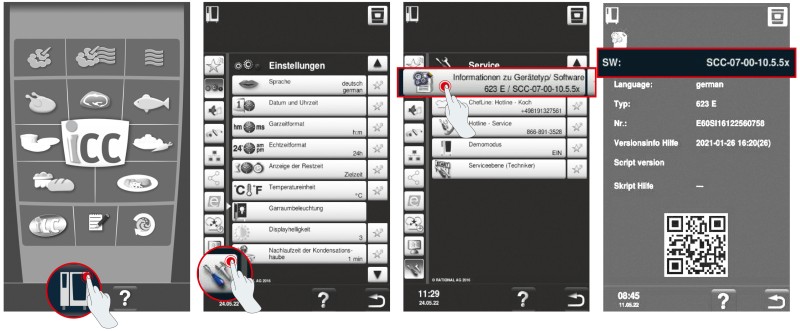
1. Select “Cooking system.”
2. Click “Settings.”
3. Click “Information.”
4. Installed software version.
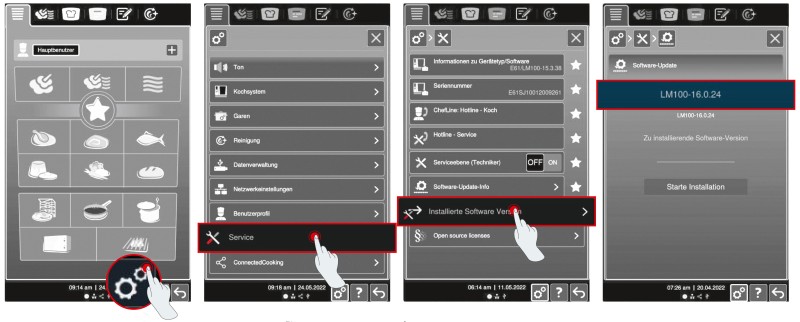
1. Click “Settings.”
2. Click “Service.”
3. Click “Installed software version.”
4. Installed software version.
Software updates are made available on the app at the same time as they are released on ConnectedCooking. New versions are released at irregular intervals and cannot be predicted.
ConnectedCooking.
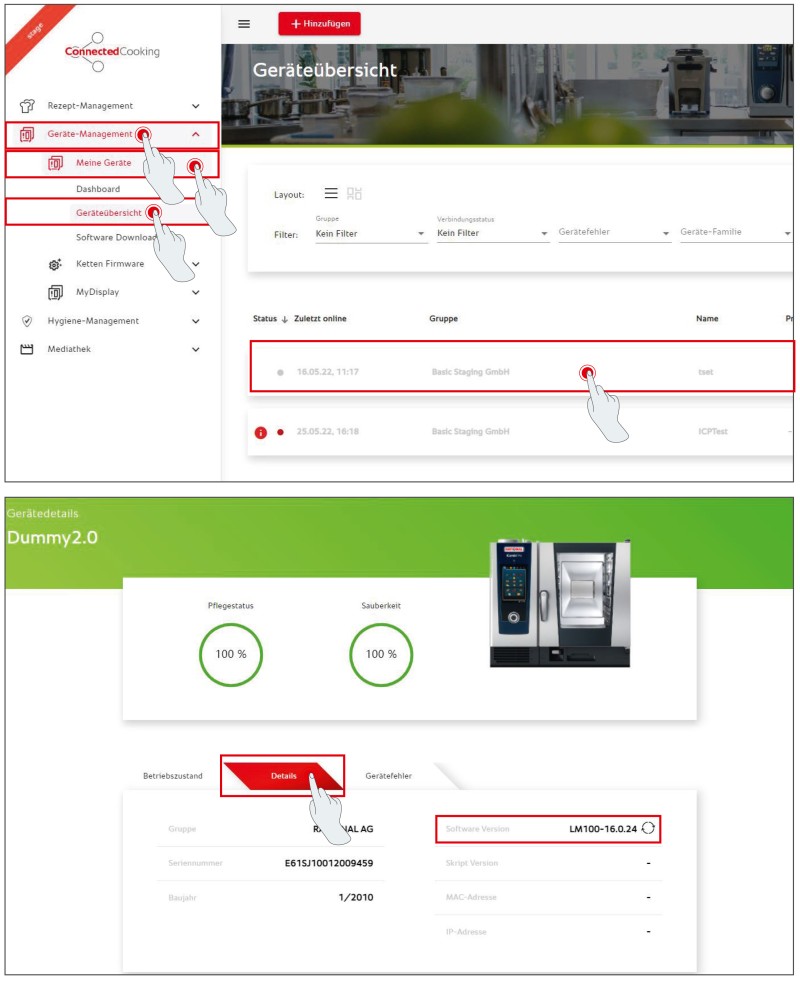
1. Select your cooking system on the cooking system overview screen in ConnectedCooking.
2. The installed software version is listed under Details.
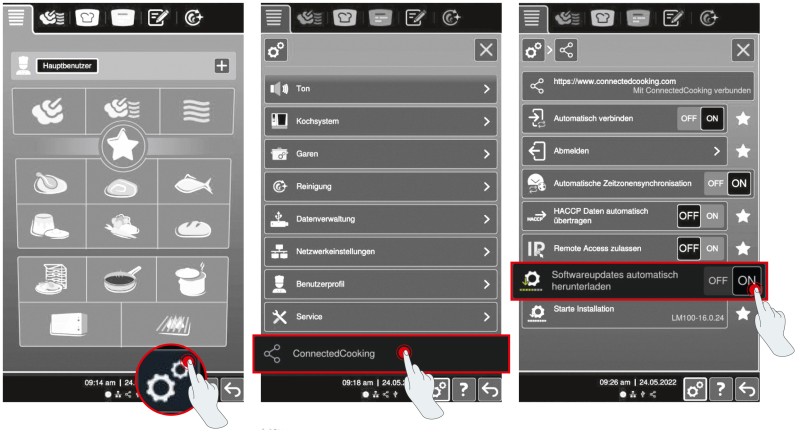
1. Click “Cooking system.”
2. Click “ConnectedCooking.”
3. Set “Automatic software updates” to “On.”
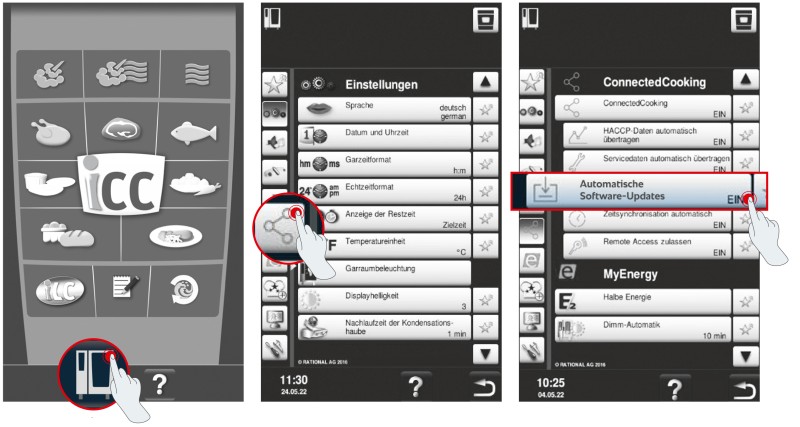
1. Click “Settings.”
2. Scroll down and click “ConnectedCooking.”
3. Set “Download software updates automatically” to “ON.”
App: RATIONAL Updater.
The app is available for iOS (version 13 onward) and Android (version 7/Nougat onward).
The RATIONAL Updater app works for all iCombi Pro and iHexagon models with software version LM100-17.0.26 or later currently installed, as well as iVario models (except iVario 2-XS without WLAN) with software version LMX-2.13.8 or later currently installed. The RATIONAL Updater app is not compatible with iCombi Classic, SelfCookingCenter, or VarioCookingCenter models.
About 2.5 GB of data is downloaded in total. Accordingly, download times depend on your Internet speed (WLAN, 5G, etc.), but typically average 5-15 minutes. Although downloads will continue in the background, they may take longer, so it is best to keep the app running in the foreground.
The data transfer usually takes 3-5 minutes, depending on the size of the update. For optimum transfer speeds, keep the app running in the foreground.
Software updates are made available on the app at the same time as they are released on ConnectedCooking. New versions are released at irregular intervals and cannot be predicted.
No. You will only need a working Internet connection to download the software package to your smartphone (since as much as 2 GB of data will be transferred, we recommend using a WLAN connection). A wireless connection is established between your cooking system and your smartphone for the transfer (see How-to PDF); no Internet connection is required for this.
If an error occurs during the transfer process, try the following:
- Make sure that your cell phone is unlocked and positioned as close to the cooking system as possible, with the app running in the foreground. Using other apps during the transfer or having the devices too far apart can disrupt or even halt the process.
- If an error occurs, try restarting the transfer and be mindful of the information above. The cooking system will recall which packages it has already finished downloading, making the rest of the transfer process more efficient.
- If the transfer fails repeatedly, close the app and try again. If transfer issues persist even after restarting the app, consider resetting the app (menu item “More” > “Reset app”).
This function is only available with software versions LM100-17.3.14 (iCombi Pro) / LMX-2.16.16 (iVario) and up. These versions have been available since 10/7/2024. Once you have updated your cooking system to that version or a more recent one, you will be able to see transfer status.
Unfortunately, no.